
The Infinite Field Guide · Before the big day

Golf Simulator Bachelor & Bachelorette Party Ideas

Good friends. A little competition. A plan that leaves room for both.

For a golf simulator bachelor or bachelorette party, start with two short games, a practice turn for beginners, and time to eat and catch up. Choose your formats, compare rental costs, and put the day on one printable plan.

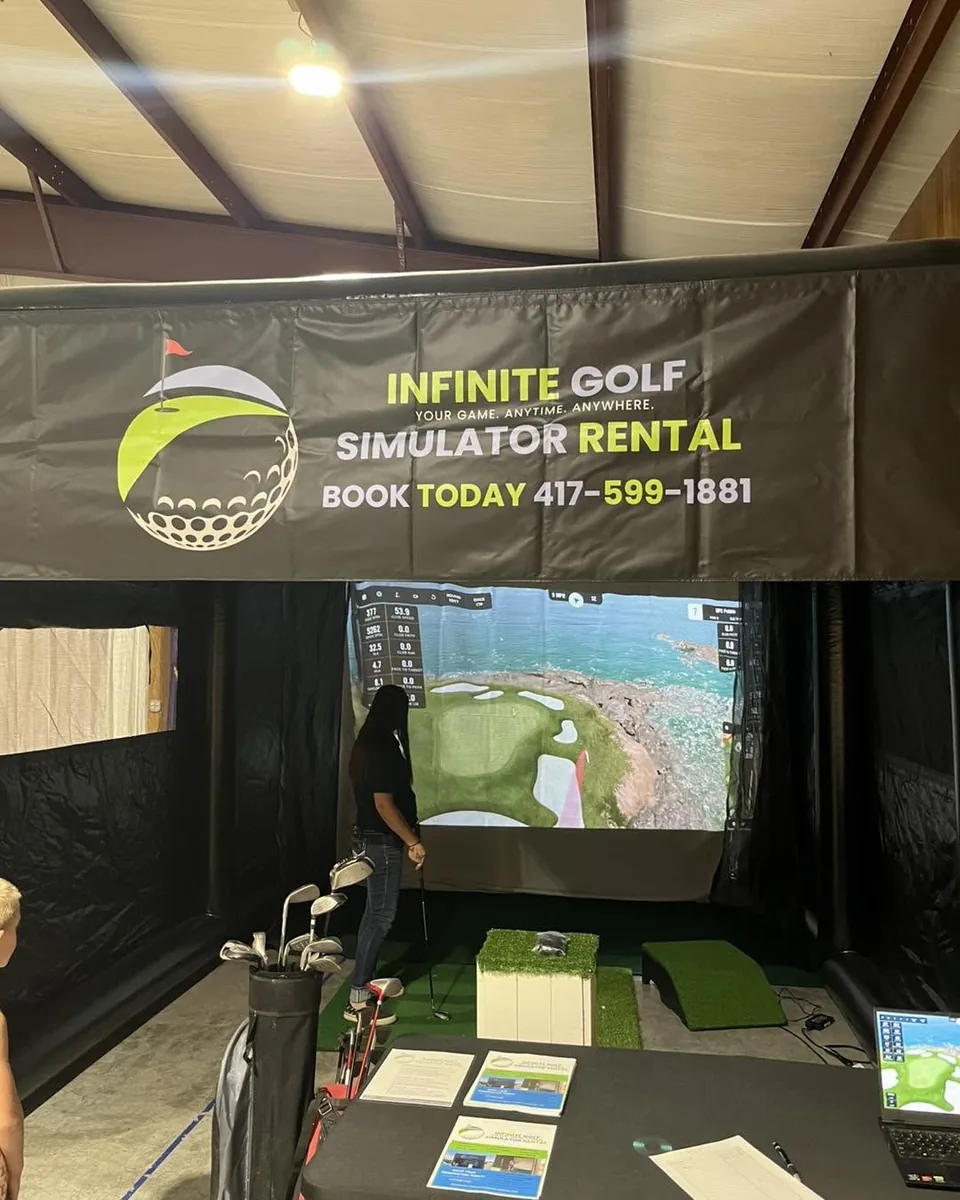
A guest playing inside the branded Infinite Golf simulator at the Bolivar Elks Family Event
Actual family event · Bolivar, MissouriSee the Bolivar Elks Family Event photos

A useful starting point

Make it easy for
every friend to join.

A bachelor or bachelorette party can mix regular golfers, occasional players, and friends who have never held a club. Choose a shared challenge with short turns so people can join in without committing to a full virtual round.

For a mixed group, start with team closest-to-the-pin. For a golf-focused group, add a short-hole scramble. Pick two formats for the day and keep a third in reserve; you do not need to run every game below.

Deciding between going out and staying at your venue? An indoor golf facility means the group travels to its bays. A mobile golf simulator comes to an approved event space, with setup and hosting handled as part of the rental. Check the venue before building the rest of your itinerary around it.

01 · Choose your games

Five golf simulator games
for your wedding party.

Match the game to your friends, then confirm the target or course, scoring method, and attempt limit with your host before play.

Our starting suggestion · Mixed experience

Team closest-to-the-pin

One good shot can give the whole team something to cheer about.

  1. Make balanced teams with the same number of players. Choose one target and the same settings for everyone.
  2. Give each player one practice shot and two scored attempts. Count each team's closest valid recorded shot.
  3. The smallest distance wins. If teams tie, use one nominated player per team for a same-condition playoff, or share the win.

For first-timers: ask the host for an approachable target distance. A teammate's good result keeps the team involved even when someone's first swings miss.

Simple individual challenge

Two-shot closest-to-the-pin

A clear target and a second chance.

  1. Keep the same target and settings for all players. Decide whether only shots on the green qualify.
  2. Allow one practice shot, then two scored attempts. Record the better valid distance for each player.
  3. Lowest valid distance wins. If the best distances tie, share the win or give each tied player one extra attempt under the same settings.

For first-timers: consider allowing any valid recorded finish instead of requiring the green. Everyone must use the same rule. See the full closest-to-the-pin guide for no-reads and ties.

For a group that wants to play a hole

One-hole team scramble

A little course play without making a full round the whole party.

  1. With the host, confirm a short hole and a supported scramble setup. Agree on putting, gimmes, and a maximum score before starting.
  2. Each teammate hits. Choose the best result and have the team play from that position, repeating until the hole is complete.
  3. Compare team stroke totals under the same settings. Keep equal scores tied if the next activity is due.

For first-timers: pair experienced and new players. If course setup or time makes this cumbersome, use the team target game instead.

Optional · Confident golfers

Longest drive in the fairway

Accuracy keeps a distance challenge interesting.

  1. Ask the host to confirm a suitable setting, safe club clearance, and a clearly defined fairway landing area.
  2. Give everyone two scored drives after the same practice allowance. Agree whether the displayed carry or total distance counts.
  3. The longest qualifying result wins. Shots outside the agreed area do not qualify; tied results share the win or use a playoff.

For first-timers: make this optional and offer a separate target challenge. Do not pressure anyone to swing harder or join a distance contest.

Build a score together

The three-target ladder

Every qualifying shot adds a point.

  1. Ask the host to confirm three target distances and a scoring zone around each flag. Write down how close a ball must finish to earn a point.
  2. Each player gets one scored shot at each target, under the same settings. Award one point for a valid finish inside the agreed zone, zero outside it: up to three points per player. Keep score on paper.
  3. Add the points for each equal-size team. The most points wins; share a tie or let every player take one more shot at the same agreed target.

For first-timers: choose shorter targets and wider scoring zones for the whole group. If changing targets takes too long, use one confirmed target for all three attempts and keep the points format.

02 · Give the day some breathing room

A four-hour golf
party itinerary.

An illustrative schedule for a party with golf as one activity. Adjust the playing blocks to your group's size and pace; setup happens before the live window.

Protect dinner reservations and transportation times first. Then fit the game around them.

Work out participation and turn time
  1. 0:00–0:20

    Arrive & get comfortable

    Meet the host, hear the setup rules, and make teams. Offer introductory turns as the group settles in.

  2. 0:20–1:15

    Play the first challenge

    Run a short target game. Keep the same turn order and give first attempts priority over repeats.

  3. 1:15–2:00

    Food & time together

    Leave room to eat and talk. Any optional play still needs the host's supervision; food and drinks stay outside the hitting area.

  4. 2:00–3:15

    Rematch or change the format

    Swap teammates, try another target, or use the short scramble if the host confirms it fits the remaining time.

  5. 3:15–4:00

    Finish together

    Wrap up remaining turns, announce results, and move to your next activity. Avoid starting a new round you cannot finish.

03 · Work out the budget

How much does a golf simulator party cost?

Infinite Golf's mobile rentals start at $450 for Birdie and $850 for Eagle. Both include up to four live event hours, on-site hosting, setup, and teardown. Setup and teardown are outside that live time.

Start with the event total.

Birdie includes one host and the core simulator experience. Eagle includes two large external displays, a two-person event team, and the Event Recap Collection. Choose based on what your event needs.

30 minutes of travel is included; anything farther requires a custom travel quote. Extra live hours are $75 for Birdie or $150 for Eagle, with the schedule confirmed during quoting. Optional add-ons also change the total.

See current packages and inclusions
Illustrative cost sharing · Base package only
People sharingBirdie
$450 ÷ group
Eagle
$850 ÷ group
8$56.25$106.25
12$37.50$70.83
16$28.13$53.13

Approximate amount per person, rounded to cents. These are arithmetic examples, not per-person rates or capacity guarantees. Travel beyond the included allowance, extra hours, and add-ons are excluded. Food and venue costs are separate.

Your planning figure = confirmed rental total ÷ people contributing.

04 · Make room for the party

A golf simulator party
at your own venue.

The enclosure is only part of the footprint. Your host needs room for safe swings, equipment, access, and people waiting outside the hitting area.

Use the complete venue checklist

A private home or rented venue

Get the property owner's approval before booking entertainment at a rental home, lakehouse, or event venue. Send photos of the whole setup area, overhead obstructions, nearby power, and the load-in route. The host must confirm the actual site.

Space for people who are not hitting

Put seating and refreshments outside the swing and ball area. Keep the entrance and walkway clear. Name one organizer to help call the next player while the host operates the simulator.

An outdoor backup

For an outdoor party, agree on a weather backup with your host and venue before the event.

05 · Take the plan with you

Your printable
golf party planning sheet.

One sheet. Everyone on the same page. Print it or save it as a PDF, then fill it in with your group and discuss the details with your host.

Infinite Golf · Bachelor & bachelorette parties

Your golf party plan

Occasion / guest of honor

Date / venue address

Organizer / contact

Guests / expected players

Live golf start / finish

Dinner / transport deadline

Choose the format

Game 1

Game 2 / optional backup

Teams / turn order

Practice / scored attempts

Valid result / tie rule

Confirm before the day

  • Property permission and host site approval
  • Clear space, power, and load-in access
  • Waiting area outside the hitting space
  • Outdoor weather plan, if applicable
  • Package, travel, extras, and final total

Confirmed total ÷ contributors

Keep a simple score · Note distance units or scoring method above
Player / teamGame 1 resultGame 2 result


Before you book

Golf party planning,
answered.

Can non-golfers enjoy a golf simulator party?

Choose a short target game, offer a practice turn, and balance teams by experience. Guests can also cheer or help keep score. Avoid making a full round or a longest-drive contest a requirement for everyone.

How many guests can use one simulator?

Guests take turns; total attendance is different from active participation. The answer depends on how many want to hit, how many attempts they get, and how much live time is available. Use the capacity planning guide and confirm your plan with the host.

Can you bring the simulator to our rental house?

Share the address and setup photos, and get the property owner's permission. Serviceability, travel, safe clearance, power, access, and any outdoor weather plan must be confirmed. A rental listing alone does not confirm that the space is suitable.

Do guests need their own golf clubs?

Infinite Golf provides clubs and balls. Your on-site host runs the equipment and helps guests take turns. See what is included with our bachelor and bachelorette party rentals.

How much space does the simulator need?

The enclosure measures 12 feet wide × 16 feet deep × 10 feet high. The full setup also needs safe guest access and operating clearance. Send venue measurements and photos for confirmation using the venue checklist.

Do we need all five games?

No. Two simple formats and time to socialize are a useful starting point. Keep a third as an option if the group wants a change and the host confirms there is time.

From a good idea to your date

Bring the golf.
Keep the celebration yours.

Planning in Springfield, Bolivar, or elsewhere in our Southwest Missouri service area? Start with your date, venue or city, and rough group size. We can confirm the setup and quote from there.